Page Experience
Three checks in one place: what's broken on your pages, whether Google can index them, and how fast they are for real visitors.
In appInstrumentsPage Experience
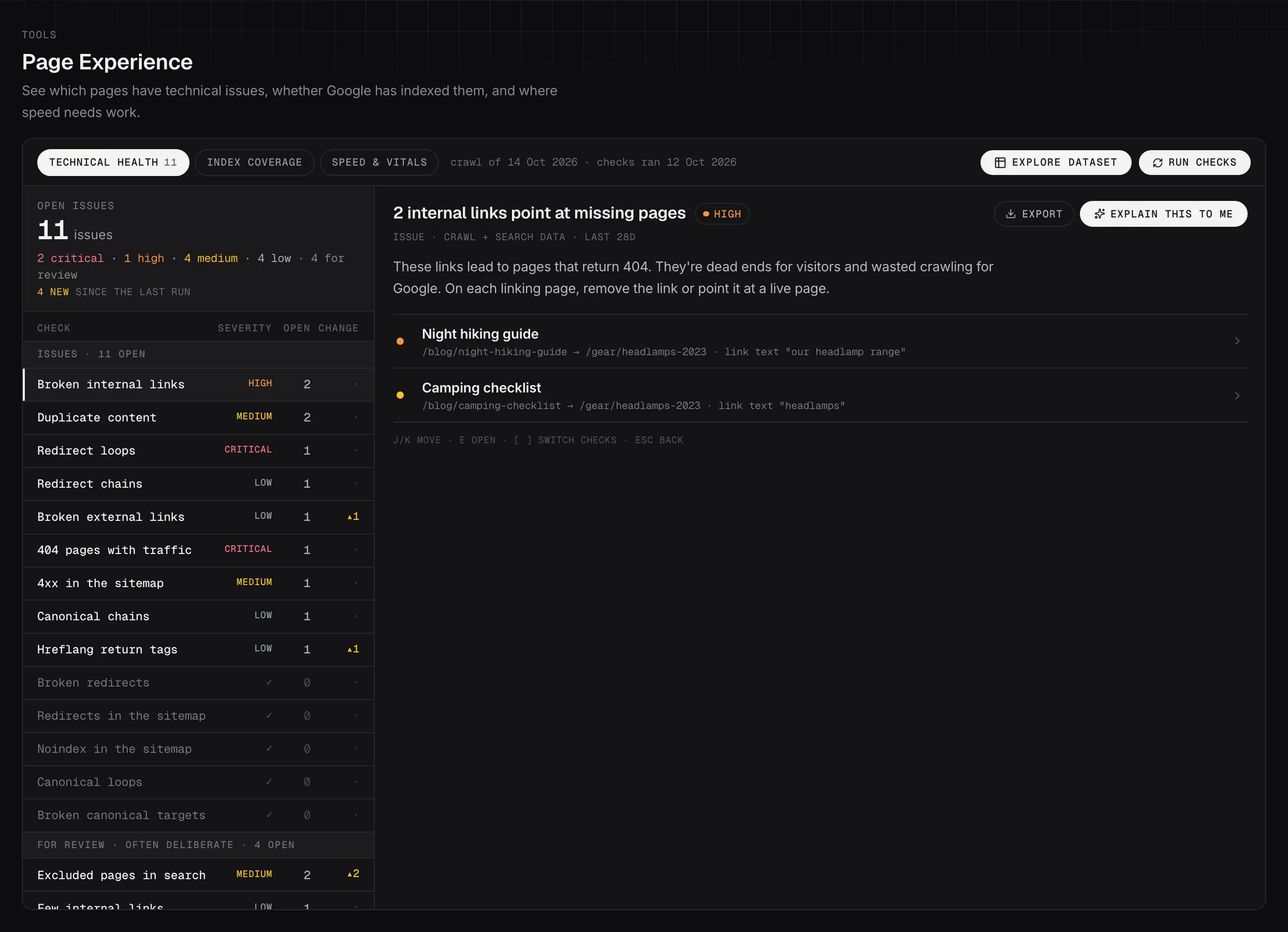
Page Experience, Technical Health: open issues by check, with the pages behind each one.
Demo dataThree tabs, three different jobs
The tabs across the top are separate tools that happen to sit together in Page Experience, and they're worth treating that way rather than working through left to right.
- Technical Health is what's broken on your site: redirects, broken links, canonicals, duplicates. It opens here by default.
- Index Coverage asks Google what it thinks of each page, one page at a time.
- Speed & Vitals measures how fast pages are for real visitors.
Nothing carries over between them. A page can be fast, indexed and still have three technical faults, which is why they're counted separately.
Technical Health
Technical Health finds what's broken: links that go nowhere, redirects that loop or run three deep, canonical tags pointing at the wrong page, pages Google has dropped, duplicates of each other. None of it looks wrong to a visitor, which is why it sits there for months.
It works from your crawl and your Search Console data together, which is why it can do something neither could alone: tell you that a broken page is one people were still arriving at.
The dial reads Open issues, and it counts what's left rather than what was ever found: anything you've marked applied or ignored comes off the number. The ring shows how much of it is critical or high.
The list beside it splits in two, and the split is the useful part. Issues is things that are wrong. For review is things that are often deliberate, like a page excluded on purpose or a canonical pointing somewhere else. Review items are kept out of the dial for that reason: they'd inflate a number you're trying to drive down.
A run is twelve checks and the list has nineteen rows, because some checks report more than one kind of problem. A progress bar counting to twelve against a register of nineteen isn't a fault.
The rows are named the way the industry names them: Redirect loops, Broken redirects, Redirect chains, Broken internal links, Broken external links, 404 pages with traffic, 4xx in the sitemap, Redirects in the sitemap, Noindex in the sitemap, Canonical loops, Broken canonical targets, Canonical chains, Duplicate content, Hreflang return tags, Excluded pages in search, Canonicalized URLs, Few internal links, Slow server response and Crawl coverage.
404 pages with traffic and Excluded pages in search are the two to look at first on most sites. Both mean a page search already values isn't reachable or isn't eligible, and the fix is usually a redirect or a settings change rather than new content.
Each row shows how many are open and what changed since the last run, so a number going the wrong way is visible without opening anything. Clicking a check opens the pages behind it, and clicking a page opens the evidence and the fix for that one URL. Esc goes back, and J and K move through rows if you're working down a long list.
It needs a crawl. If yours is more than 30 days old the page says so rather than quietly reporting on a stale picture.
Index Coverage
Index Coverage asks Google directly, page by page, and reports the answer it gives back. That makes it the only place in Searchscope where the verdict is Google's own rather than something worked out from your data.
Four numbers run across the top and they're a funnel: how many pages were crawled, how many can be indexed, how many are in Google, and how many are getting clicks. The gap between any two of them is a question worth asking, and the one between "can be indexed" and "in Google" is usually the interesting one.
Underneath, every page sits in a state, and the states are Google's words rather than ours:
- Indexed: it's in.
- Crawled, not indexed: Google fetched it and chose not to index it. Usually a quality or duplication judgment, and the most common surprise here.
- Found, not crawled: Google knows the URL exists and hasn't fetched it yet. Often a crawl budget or internal linking signal.
- Unknown to Google: it has never heard of the page at all.
- Server error: your server failed when Google asked.
- Excluded by noindex, Duplicate, Redirects elsewhere, Blocked, Google sees a 404 and Other are grouped as review rather than as problems, because most of them are things somebody decided on purpose.
- Not checked with Google isn't a verdict. It's the queue.
The state is what Google reports, not a guess at why. "Excluded by noindex" rather than "hidden by mistake": the data can't see intent, so plenty of these are deliberate and the judgment stays yours.
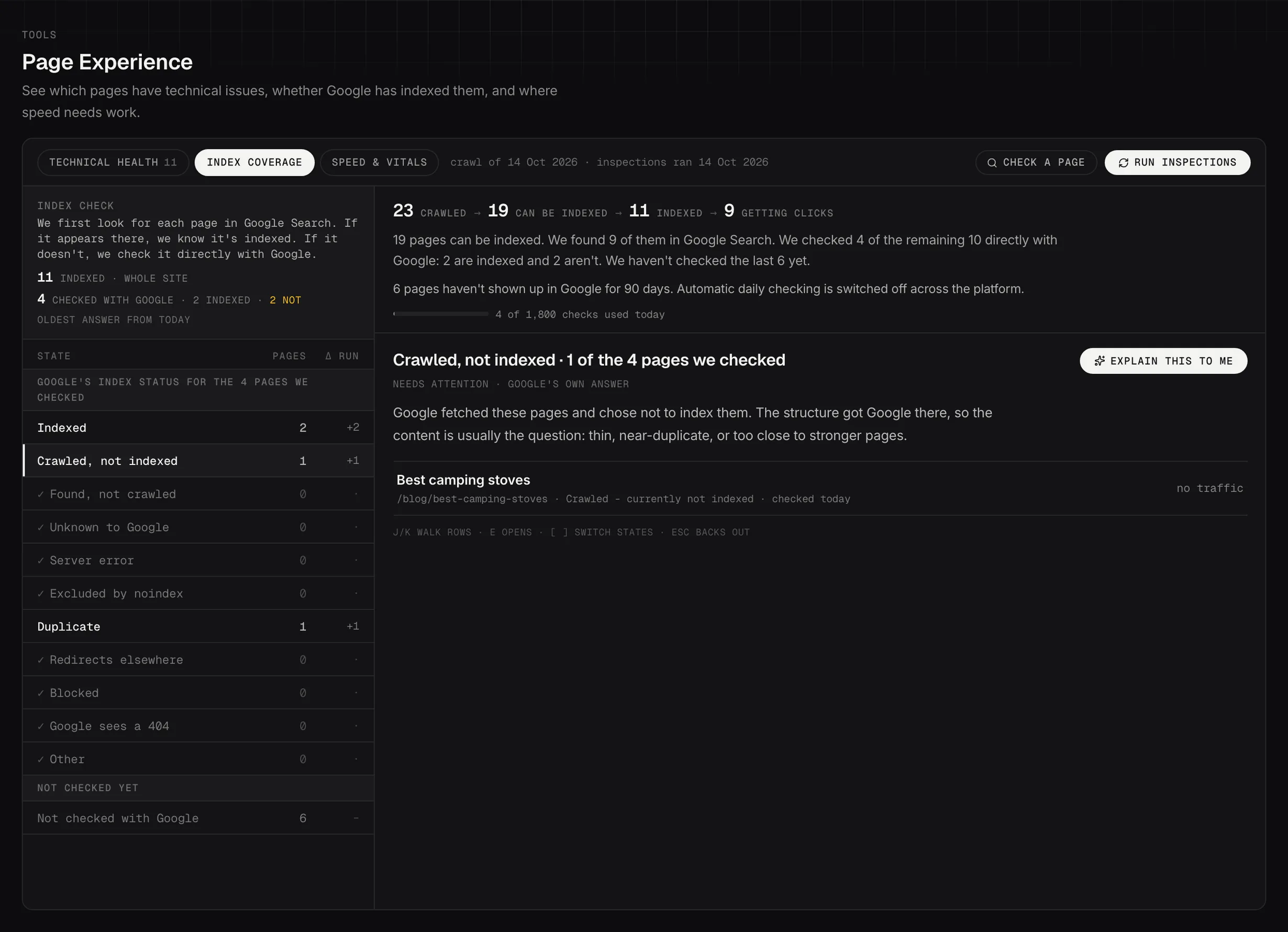
Index Coverage: what Google itself says about the pages it was asked about.
Demo dataSpeed & Vitals
Core Web Vitals for a page or a whole section of the site: how quickly the main content appears, how soon the page responds to a tap, and how much it shifts around while it loads.
The dial reads Performance score, and it's the median across the pages measured rather than any one page, so a single slow outlier doesn't set the number. 90 and above is good, 50 to 89 needs work, below 50 is poor. Accessibility, best practices and SEO scores sit beside it from the same run.
Measure mobile, desktop or both, chosen when you set the run going. Where both were measured, the toggle above the dial switches which one you're looking at; it doesn't re-measure anything. Mobile is the one Google ranks on, so a good desktop score is not the answer to a mobile problem.
The audit names the specific cause rather than the score: images with no width and height set, so the page jumps; a font loading late; a script blocking the first paint. The trend chart switches between the overall score and LCP, CLS and INP on their own, which is what you want when one metric is dragging the rest down.
Two AI actions sit on the results: Explain the vitals in plain words, and What should my developer do first. The second is the one to send on.
Look for a template rather than a page. Twenty slow pages sharing a layout are one fix, not twenty, and the grouping in the list is there to make that visible.
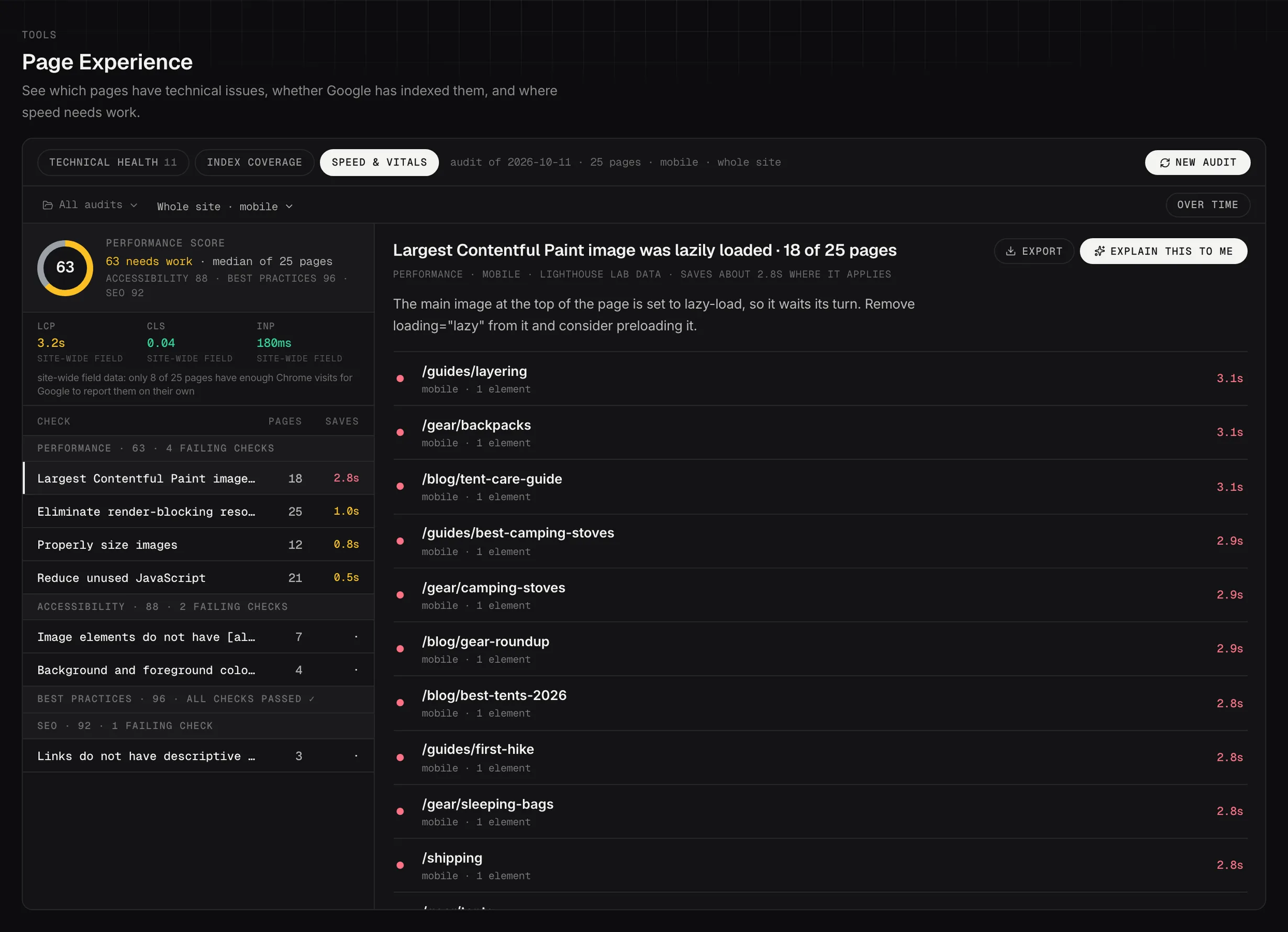
Speed & Vitals: PageSpeed Insights audits, with the pages and elements behind each failing check.
Demo dataWho fixes what, and how long it takes
Every Technical Health finding carries two chips: who it needs and how much effort it is. Who is developer, content team or anyone, where anyone means no specialist. Effort is copy-paste, quick edit or dev work.
That's what makes the list sortable by something other than severity. Copy-paste and anyone is the set you can clear this afternoon without booking anybody; developer and dev work is the list for the next planning conversation.
The For review items carry neither chip. They read your call instead, because a deliberate noindex isn't a task and putting an effort estimate on it would imply it needs doing.
When the checks run, and the daily limit
Technical Health runs when you press Run checks, and it reads the most recent crawl rather than starting a new one.
Index Coverage is different, because Google sets the pace. The first check starts on its own once the crawl finishes, then runs nightly. Google allows 2,000 page checks a day for a site and Searchscope uses up to 1,800 of them overnight, keeping the rest back so you can still check a page by hand during the day. A big site is therefore covered over several nights rather than all at once, and the page tells you how many have been asked so far and how old the oldest answer is.
Speed & Vitals runs when you ask it to, on the pages or the section you pick.
Handing it to a developer
Redirect findings export as a map in four formats: nginx, .htaccess, Vercel or CSV. The first three are rules your developer can paste straight into a config. Technical Health and Speed & Vitals lists also export as CSV; Index Coverage has no export, so take what you need from the list itself.
So the output of a session here is usually a file someone else can apply, rather than a list they have to re-type.
Technical Health is also the tab that can become a worksheet, which is the better move when the work will take more than one sitting or more than one person. Index Coverage and Speed & Vitals can't, so if you want to hand those on, the export is the route.