Content Planner
Every piece of content work in one sheet, from idea to published and cited.
In appInstrumentsContent Planner
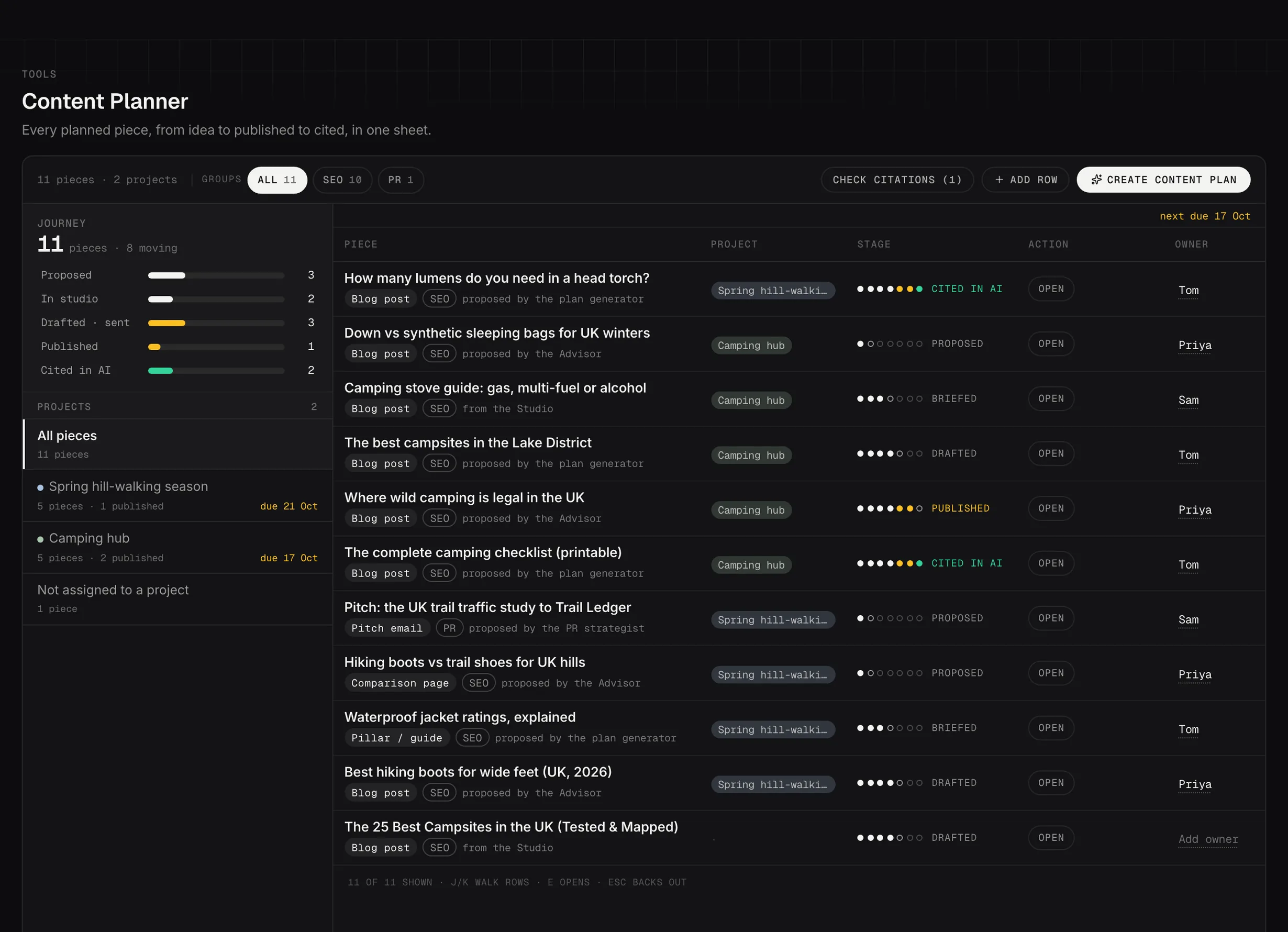
Content Planner: every planned piece, from proposal to published to cited in AI.
Demo dataWhat's in it
Proposals from your strategists, live Content Studio sessions, and rows you add by hand. One place for the whole pipeline rather than a plan in one tool and the work in another.
Drafting a plan
The wizard suggests objectives from your own numbers, you set the scope, and it writes a piece for every objective, or tells you why it couldn't.
You keep what you agree with. Nothing is created until you say so.
The journey ladder
Every piece has a journey, and the rail on the left is that journey as a ladder: proposed, in Studio, briefed, drafted, then sent, published and cited in AI. The counts beside each rung are how many pieces are sitting there.
The ladder doubles as the filter. Click a rung to see only the pieces at that stage, which is the fastest way to answer "what's waiting on me" rather than scrolling the whole sheet.
Why some stages move on their own and some don't
Four of the seven stages advance on their own and three only move when you say so. That split explains the question everyone asks about the Content Planner, which is why a piece looks stuck.
Proposed, in Studio, briefed and drafted move by themselves. They're read from what's actually happened: a strategist proposed it, a Content Studio session opened, a brief was written, a draft was generated. You don't set them and you can't.
Sent, published and cited are facts you record. Nothing advances past drafted until you say so, because Searchscope can't see you emailing a draft to a client or pressing publish on your CMS. Open a piece and mark it sent or published, and add the published URL.
So a piece stuck on drafted usually isn't stuck. It's waiting for someone to say what happened to it.
A piece can also read failed, which means the generator couldn't write that one. It says why rather than leaving a gap.
Cited in AI, the stage most plans never reach
Once you've recorded a published URL, that page is checked against your AI visibility runs until an assistant cites it. That's the last rung, and it's the one most content plans have no way of closing.
It's also why the published URL is worth recording properly rather than roughly: it's what the citation check matches against.
Projects, and the SEO or PR group
Two different groupings, and they're easy to mix up.
Projects are yours. Create one, give it a name, and assign pieces to it: a campaign, a quarter, a client workstream, whatever you organize by. The rail shows them as a register with counts, plus All pieces and Not assigned to a project, so nothing gets lost by not being filed.
Groups are automatic, and there are only two: SEO and PR. PR covers press releases, pitch emails, guest posts and data stories, or anything the PR Strategist proposed. Everything else counts as SEO.
One wrinkle in that: SEO is the fallback rather than a classification. A piece with no content type set counts as SEO because it failed the PR test, not because anything decided it was SEO. If your SEO group looks larger than it should, that's usually why, and setting the type on those pieces fixes it.