Getting started with Searchscope
What to do in your first session, and what each part of Searchscope is for.
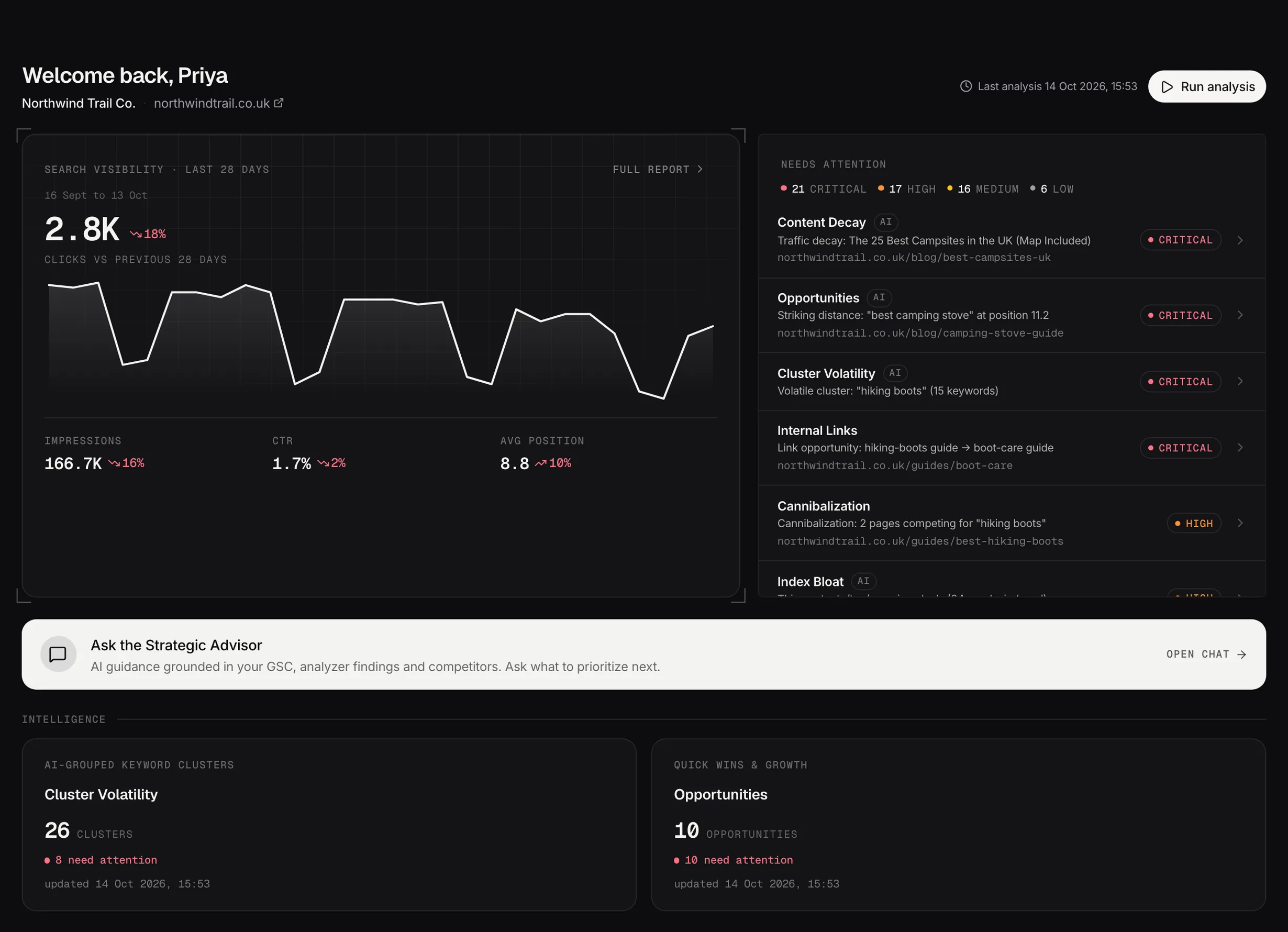
The dashboard: the last 28 days of search performance beside the findings that need attention first.
Demo dataConnect your data first
Searchscope works from two things: your Google Search Console account and a crawl of your site. Connect Search Console and point it at the property you want to work on, and the first crawl starts on its own.
Nothing else works properly until this is done, because every analyzer reads from the same crawl and the same search data. The Data Pipeline page shows you how far it's got.
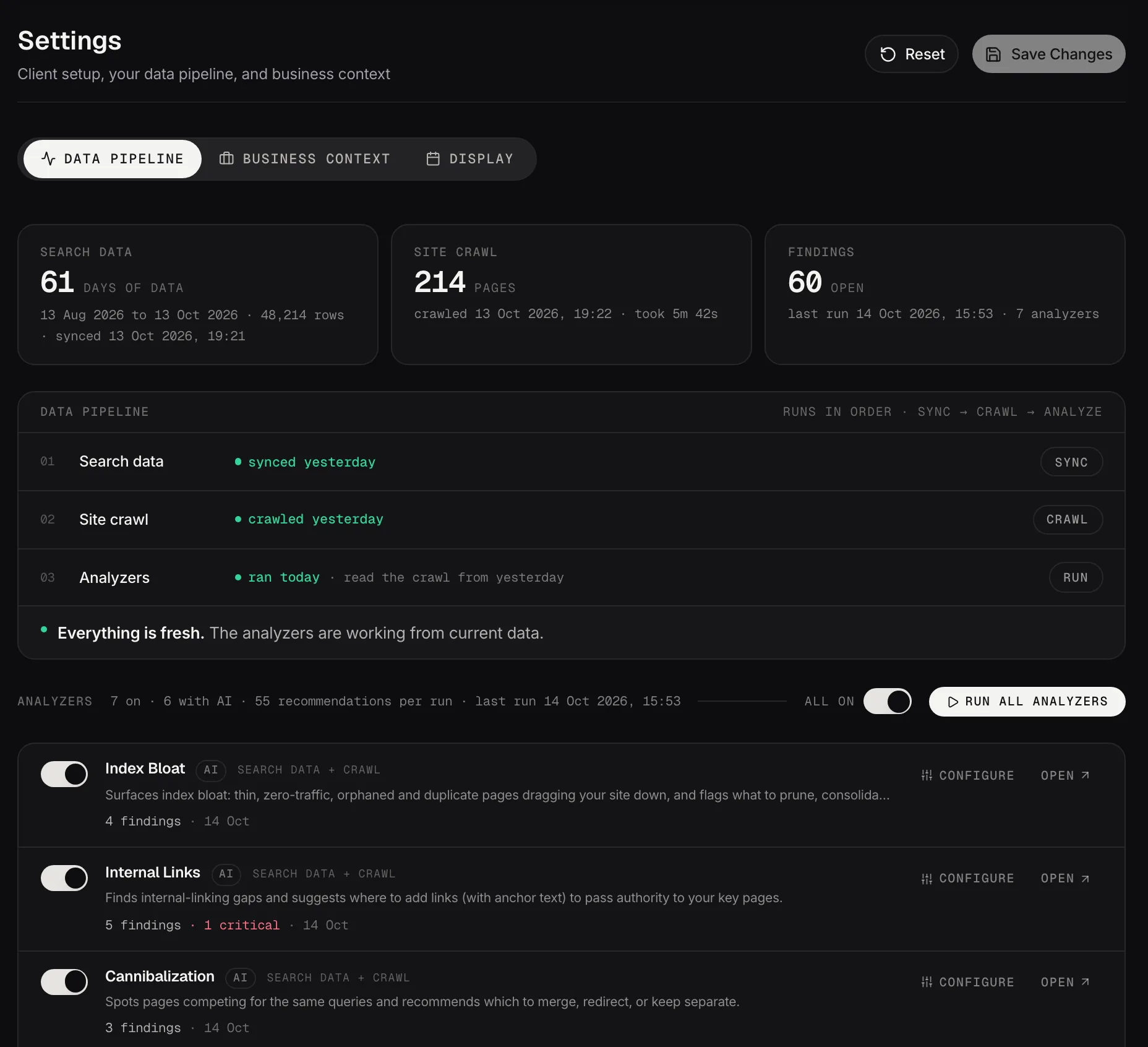
The data pipeline: search data, the crawl and the analyzers, run in order and checked for freshness.
Demo dataThen let the first analysis run
The analyzers run in order and unlock as they finish, so the sidebar fills in over the first session rather than all at once. A greyed workspace isn't broken, it's waiting for its analyzer.
You don't have to sit and watch. The dashboard shows what's finished and what each check found.
Start with the findings, not the tools
The dashboard puts the critical and high issues from the latest analysis in front of you. Open one, read the recommendation written for that page, and use it.
That's the shortest route to something useful. The rest of the platform makes more sense once you've seen a finding and acted on it.
Fill in your business context early
Settings has a Business Context tab, and it changes more of Searchscope than anything else you can fill in. Ten short fields: what the business does, how it makes money, who it sells to, what sets it apart, what a conversion is, which pages actually make money, and how your URLs are organized.
It's read by the Strategic Advisor, Content Studio, the Content Planner, prompt discovery and your reports. Left empty, all of those still work and all of them are generic in a way that's hard to put your finger on.
Target market is on the same tab, and it's worth getting right on day one: it sets the country behind Demand & Trends, including the search volumes, and the default market for Competitive Landscape.
If your business has a season, turn on Seasonal business while you're there. It stops Content Decay reading your quiet half of the year as decline.
A couple of sentences per field is plenty. It's the highest return on ten minutes anywhere in the product.
Where everything lives
Workspace analyzers are the technical checks: pages competing with each other, content losing clicks, missing internal links, index bloat, schema gaps.
Search intelligence is the strategic view: how topics are moving, where competitors are stronger, and a Strategist that has already read your data.
AI and brand intelligence is how assistants answer questions about you.
Instruments are where the work gets done: Content Studio writes, Content Planner sequences, Reporting shows the result.
Getting started
Foundation
- Data PipelineWhere your data comes from, how to tune the crawl, and how to stop the analyzers reporting on pages you don't care about.
- Business contextWhat your business does, in your words. It changes more of Searchscope than anything else you can fill in.
- SchedulerWhat Searchscope runs automatically, and when.
Workspace analyzers
- CannibalizationTwo of your own pages competing for the same search, and which one should win.
- Content DecayPages slowly losing the clicks they used to get, and a recovery plan for each.
- Internal LinksInternal links your site is missing, with the anchor text to use.
- Index BloatPages that hurt more than they help: thin, duplicated, or getting no traffic at all.
- OpportunitiesPages ranking just off page 1, where a small push could move them onto it.
- Cluster VolatilityWhole topics moving up or down, rather than single keywords.
- SchemaStructured data your pages are missing, with the JSON-LD ready to paste.
- WorksheetsA snapshot of a workspace turned into a sheet your team can work through.
Search intelligence
- Command CenterYour search performance over time, and the detail behind it.
- Competitive LandscapeWhat competitors rank for that you don't, and where the gaps are worth closing.
- Demand & TrendsWhat the market is searching for, plotted against how much of it you capture.
- Strategic AdvisorA strategist that has already read your data, and answers from it.
AI and brand intelligence
- AI & Brand IntelligenceHow AI assistants answer questions in your market, and whether they name you.
Instruments
- ReportingClient-ready reports written from your live data.
- Content StudioBriefs and drafts written from your own data, not from a blank page.
- Content PlannerEvery piece of content work in one sheet, from idea to published and cited.
- Page ExperienceThree checks in one place: what's broken on your pages, whether Google can index them, and how fast they are for real visitors.