Demand & Trends
What the market is searching for, plotted against how much of it you capture.
In appSearch IntelligenceDemand & Trends
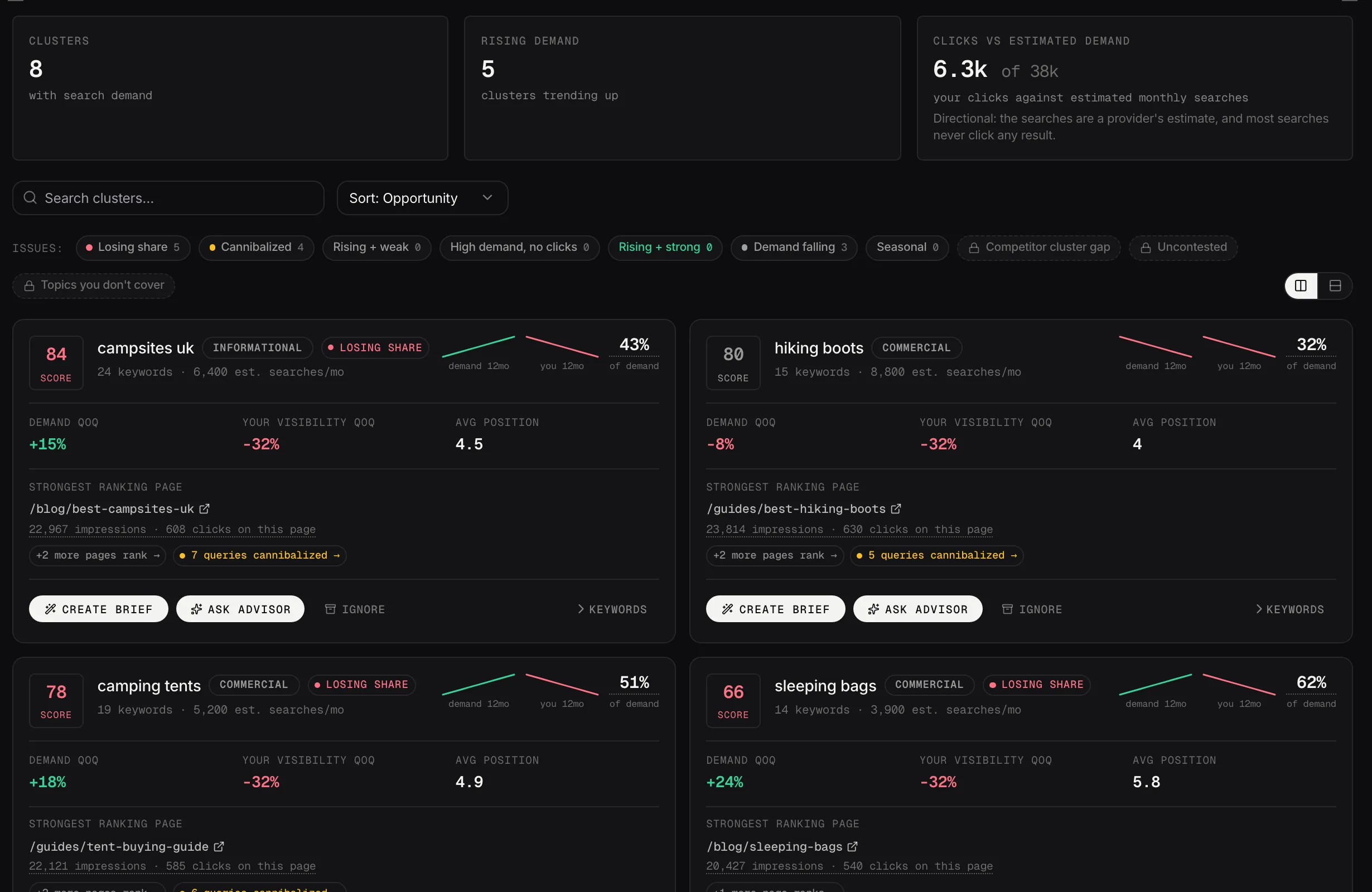
Each topic shows demand change, your visibility change and the page that ranks best for it.
Demo dataReading the chart
Your topics are plotted against the market: how much demand each carries, and where you sit in it.
High demand where you rank poorly is the quadrant to work in. It's the shaded zone on the chart, and it's the whole reason this view exists.
The figures above it
How many topics carry search demand, how many are growing, and how much of that demand turns into clicks for you. That last one is usually humbling, and it should be: most searches never click any result.
The pills underneath are filters. Click one to narrow the list to a kind of problem rather than scrolling the whole thing.
The filter pills, and what each one finds
The row marked Issues narrows the list to one kind of problem. They're the fastest way into Demand & Trends, because each one answers a different question.
- Losing share: demand for the topic is rising and your impressions are falling. The market is growing and you're taking less of it, which is the one on this row that most often turns out to matter.
- Demand falling: the topic itself is shrinking, whatever your position. A different problem from losing share and it wants a different answer: one is about your pages, the other is about the market. Useful for deciding what to stop spending on.
- Rising + weak: demand is growing and your average position is worse than 8, so you're off the top of page one as the topic gets bigger.
- Rising + strong: demand rising, your impressions rising too, and an average position in the top 10. What to defend, and worth reading for what's working.
- High demand, no clicks: at least 500 searches a month and not one click to your site. That's a title and description problem far more often than a ranking one, so it's usually the quickest thing on the row: you're rewriting two lines, not writing a page.
- Cannibalized: more than one of your pages ranks for the same query inside the topic, splitting the impressions. The Cannibalization workspace's problem seen from the topic end.
- Competitor cluster gap: a competitor you track is in the top 20 and beats your position by five or more, or ranks in the top 20 for keywords here you have no presence for at all.
- Uncontested: none of the competitors you track has any ranking touching the topic. Read it carefully, because it's about them and not about you: your own position isn't part of the test. And it's only as good as your competitor list, so open a few before you act on it.
- Topics you don't cover: whole topics your competitors rank for where you have no page and no visibility. This one swaps the list below rather than filtering it.
The number on each pill is how many topics match, so a pill showing zero is a question you don't have to ask today.
The last three need a competitor. They're greyed out until you've added one in Competitive Landscape, and they compare against the three most recently added, using cached rankings rather than a live search. So they tell you about the competitors you named, not about everyone in the results: a topic can be uncontested by your list and busy in the actual search results.
What to do with it
Every topic card carries the same two actions as the workspaces. Brief sends it to Content Studio, Ask Advisor puts it to your Strategist.
Cards also have Ignore, which drops a topic out of the list.
The region these numbers are for
The subtitle names the region the demand and volume figures come from. There's no picker in Demand & Trends: it follows Target market in Settings, under Business Context, and the volumes are pulled and cached per country.
So if these numbers look like the wrong market, that's the field to change.