Business context
What your business does, in your words. It changes more of Searchscope than anything else you can fill in.
In appSettingsBusiness Context
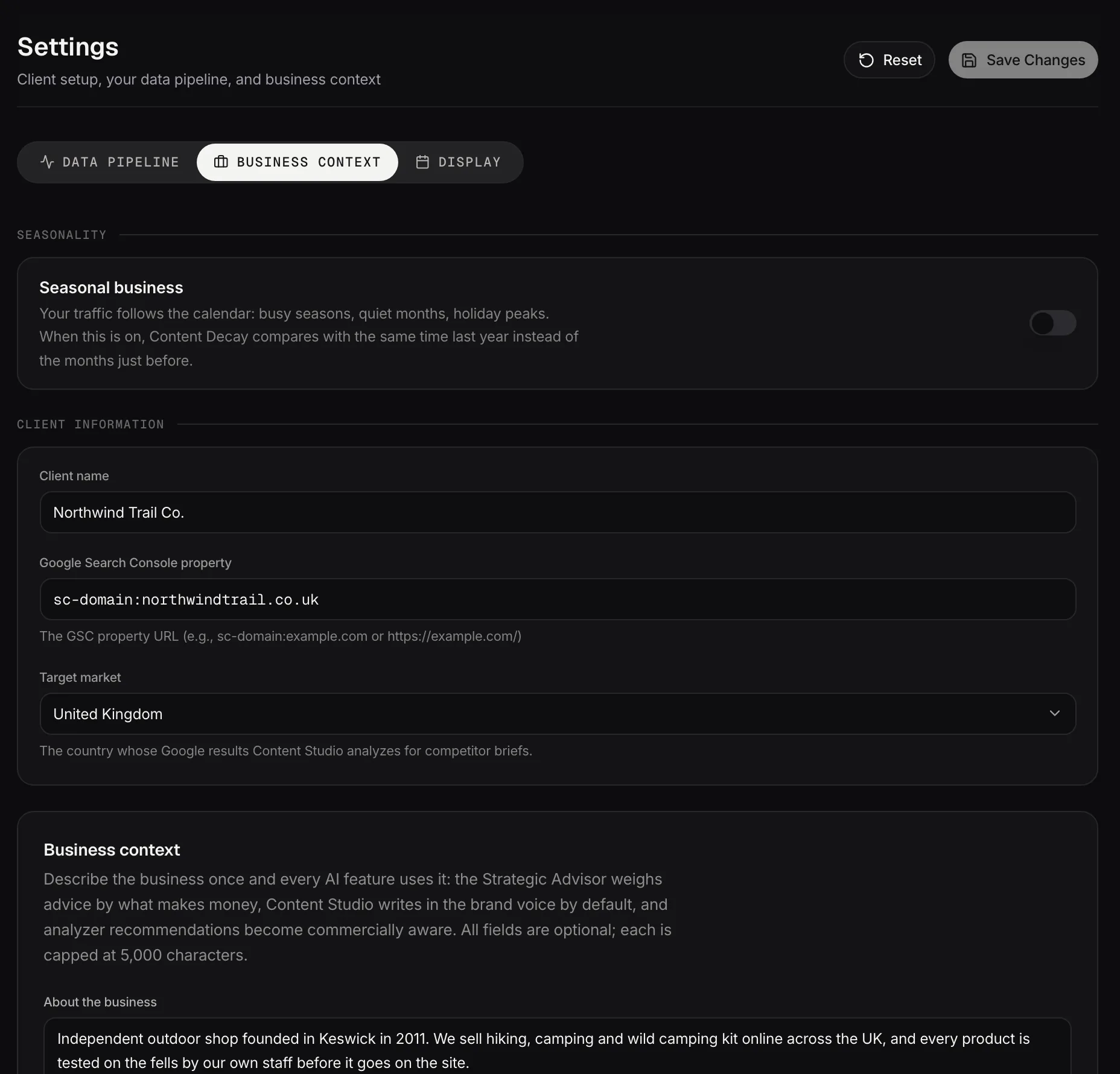
Business context: what the business sells, to whom, and the words to avoid.
Demo dataWhy this one matters
Most settings change one tool. This one is read by the Strategic Advisor, Content Studio, the Content Planner, prompt discovery in AI & Brand Intelligence, your reports and your weekly briefing.
Filled in well, recommendations come back in your language and about your actual business. Left empty, everything still runs, and the output is generic in a way that's hard to put your finger on. If you do one thing after connecting your data, do this one.
The twelve fields, and what each one changes
All of them are optional, all of them take up to 5,000 characters, and every box carries an example showing the level of detail that works. A couple of sentences each is plenty.
- About the business: what the company does. This is the one with the widest reach: the Advisor, Content Studio, your reports, the weekly plan, the seed questions for AI visibility and the analyzers themselves all read it. If you fill in nothing else, fill in this.
- Business model: how it makes money. B2B SaaS on subscriptions, a local service business and a publisher want different advice about the same finding.
- Products & services: the main things you sell, named the way you name them.
- Target audience: who you sell to. Content Studio treats this as who it's writing for.
- Primary locations & markets: the geography that matters commercially. This doesn't change which country's results are checked, which catches people out because it sits three fields under the one that does. That's Target market, in the section below.
- Differentiators (USP): what sets you apart. Without it, recommendations about positioning have nothing to position against.
- Conversion goals: what a success looks like. Content Studio writes toward these, and in AI & Brand Intelligence, having them filled in at all lifts how the commercial value of a suggested question is scored. Brand AI tells you when this is empty, which is worth acting on.
- Commercial priorities: which pages and services make money, and what you're pushing now. This is what stops advice being evenly spread across a site where the parts aren't evenly valuable.
- Site structure & naming conventions: how your URLs are organized, so a blog at
/journaland location pages at/uk/<city>aren't misread as something else. Worth knowing that the Advisor and your reports read this one and Content Studio doesn't, so it shapes analysis rather than copy. - Brand voice: the tone, in a few words. Content Studio writes in it by default, and stops when you set a tone on a session, which is deliberate: the session wins.
- Style rules: standing rules rather than tone. Sentence-case headings, no exclamation marks, a spelling you always use. Content Studio applies these every time. Reports don't: they have their own fixed voice, so a rule set here won't change report prose.
- Words & claims to avoid: your compliance and brand no-go list. Content Studio treats it as never, rather than as a preference, so it's the right place for claims you can't legally make.
Different features read different subsets, so there's no field that's wasted effort, and none that fixes everything on its own.
The two worth most of your attention
Commercial priorities and About the business. The first changes the order things are recommended in; the second changes whether the words coming back sound like your business at all.
Everything else sharpens the output. Those two decide whether it's pointed at the right thing to begin with.
Target market
Target market is the country Searchscope treats as your market, and it changes more than one tool. It sits under Client information on this tab, where the helper text says it's the country whose Google results Content Studio looks at, which undersells it.
It's also the default market for Competitive Landscape, and it sets the region behind Demand & Trends, including the search volumes, which are pulled and cached per country. Demand & Trends shows the region but has no picker of its own, so this field is where you change it.
It seeds AI visibility runs and prompt discovery too. What it doesn't touch is the workspace analyzers: those work from your crawl and your Search Console data, whatever market you've set.
Seasonal business
Seasonal business tells Searchscope your demand has a shape to it, and it's a switch on this tab worth finding if it does. Turning it on nudges Content Decay onto a year-on-year comparison, so each page is measured against itself at the same point last year rather than against last month.
Without it, a business with a summer peak sees every autumn as decay and every spring as recovery. You can still override the comparison in the Content Decay settings afterwards.
Client name and the GSC property
Both sit under Client information on this tab. The property is the Search Console property the data comes from, in the same form Google uses: sc-domain:example.com or a URL prefix.