Check group 01
Links and redirects
Redirect chains and loops, broken internal links, broken external links, and pages that return an error while still appearing in search.
A 404 is a bug. A 404 that still took 1,240 impressions in the last 28 days is a different problem, and most technical crawlers report both the same way.
Page Experience brings together three views: Technical Health, Index Coverage and Speed & Vitals. Technical Health findings include the page’s recent search impressions, so you can prioritize issues on pages people are still finding in search instead of relying on a generic severity label.
Open issues3 critical · 5 high
CheckOpenΔ
Broken internal links24▲3
404s in search7·
Redirect chains11▼4
Canonical mismatches3·
CRAWL + SEARCH CONSOLE, 28D
404s still getting traffic1,240 impr/old-stoves-guidedeveloper · copy-paste
Broken internal links312 clicks/guides/camping-stovescontent team · quick edit
Redirect chains96 impr/shop/stovesdeveloper · dev work
Canonical mismatchesfor review/blog/page/2your call
Most technical audits stop at what a crawler can see. Combining the crawl with search performance separates a dead page nobody visits from a dead page people are still finding in search.
Each finding shows who should handle it, a developer or the content team, and an estimated time to fix.
Check group 01
Redirect chains and loops, broken internal links, broken external links, and pages that return an error while still appearing in search.
Check group 02
Canonical mismatches, indexability conflicts, duplicate URL variants, exact duplicate content, and hreflang tags with no return tag.
Check group 03
Sitemap rot, money pages with too few internal links pointing at them, and slow server response times measured during the crawl.
A crawler can tell you whether a page looks indexable. It can’t tell you whether Google has actually indexed it. Searchscope checks Google’s URL Inspection API and records the verdict.
It distinguishes twelve verdicts, including crawled but not indexed, found but not crawled, excluded by noindex, duplicate, and unknown to Google.
01
Searchscope checks indexable pages with no impressions first, where Google’s verdict can materially change what you investigate next.
02
Google allows 2,000 inspections a day on a property. The automatic run stops at 1,800 and keeps 200 back, so you can still check a page yourself when something comes up.
03
The first run starts after a crawl finishes, then runs nightly. A page that isn’t indexed is rechecked at most once every two weeks.
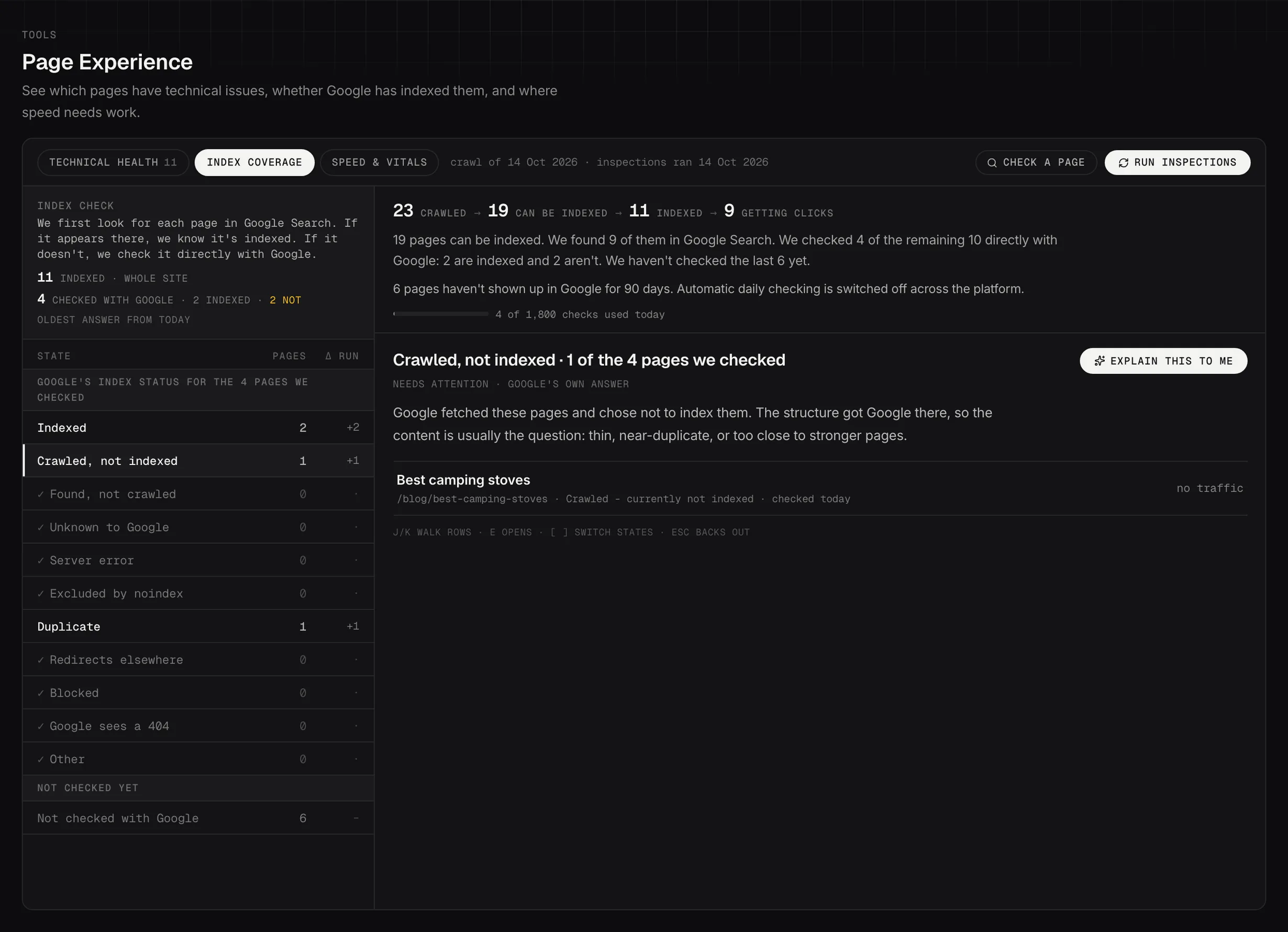
Index Coverage: what Google itself says about the pages it was asked about.
Demo dataRun an audit against one page, a section or the full crawled site. Searchscope brings the PageSpeed Insights results into one view, including Core Web Vitals, Lighthouse scores for performance, accessibility, best practices and SEO, and the individual checks that need attention.
01
Lighthouse lab data comes from a controlled test, while field data reflects real Chrome users where enough data is available. Searchscope shows them separately rather than blending them into one score.
02
Each failing check shows the affected pages and responsible elements, along with the guidance provided by Lighthouse.
03
Searchscope keeps previous audits so you can see the trend over time. Changes marked as applied are shown on the same timeline.
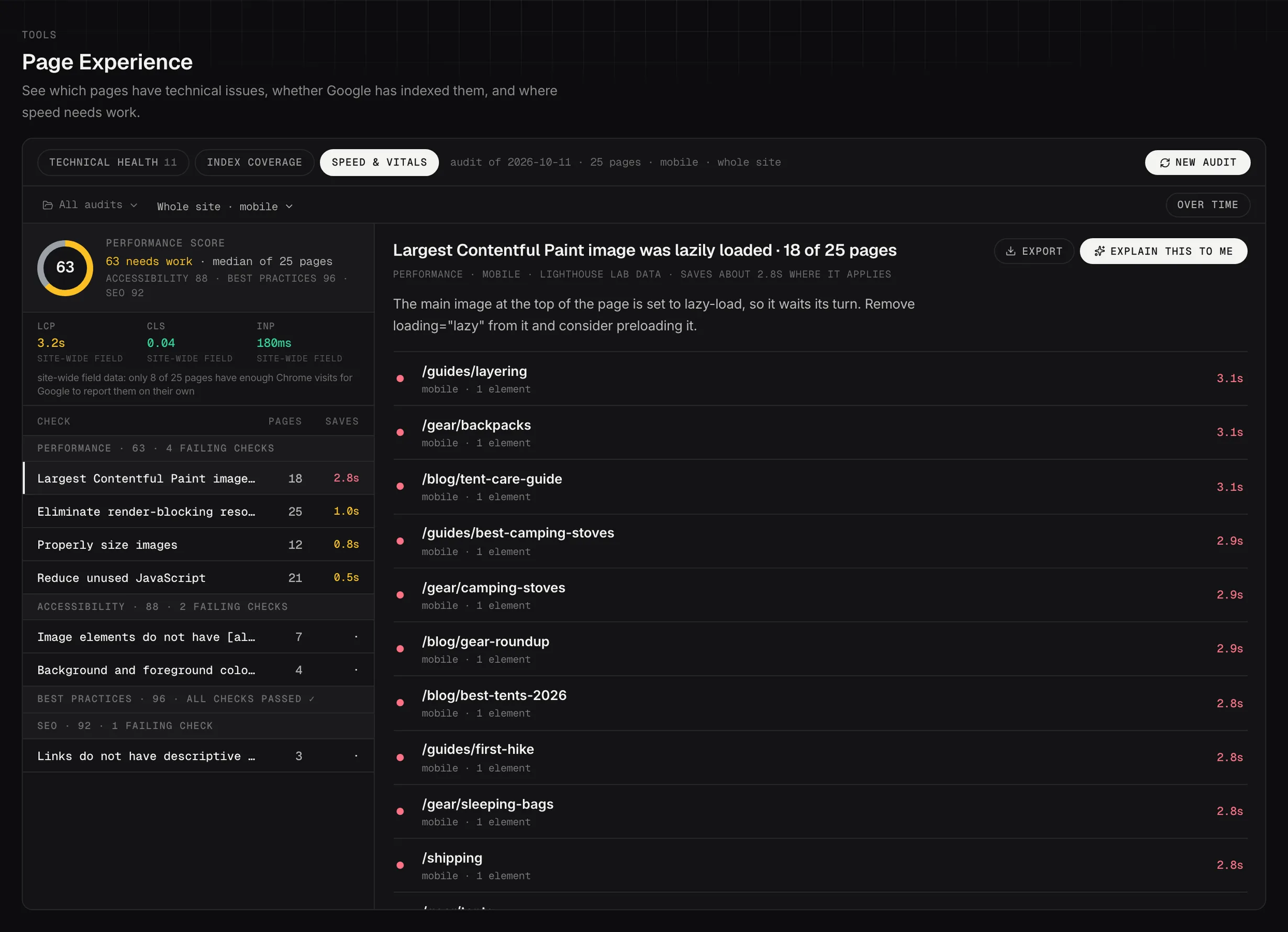
Speed & Vitals: PageSpeed Insights audits, with the pages and elements behind each failing check.
Demo dataThe quickest way to lose trust in a technical tool is a green check that turns out to mean nothing was measured. Page Experience makes its limits explicit rather than treating missing data as a clean result.
01
A check that hasn’t run yet is shown as not run. It’s never shown as a zero, and the board above it won’t show an all-clear while it’s outstanding.
02
Links out to other sites are tested in a sample, up to 100 per crawl, and that limit is shown on the finding itself, not in a footnote.
03
The slow-response finding is server response time measured during the crawl. It’s labeled as that, not presented as a Core Web Vital.
04
Once the crawl behind a set of findings is more than 30 days old, the board shows its age and suggests a fresh crawl.
Connect your site and see technical issues alongside search performance, Google’s index status and PageSpeed data, so you can prioritize the pages that deserve attention first.