A set, not a list
Choose the ones that matter most
Competitive Landscape shows how many slots you’re using and how many are left, so you know where you stand before you add one.
Add the domains you compete with. Searchscope compares their ranked keyword visibility with yours and shows where they’re ahead, where you’re close, and where neither side appears.
Every row shows how far behind you are, the estimated demand behind the query, which competitors are ahead, and its opportunity score.
KEYWORD GAP
Missing: a competitor is in the top 20 and you don’t rank at all
TRACKING
rival-outdoors.comsynced 6 days ago
bootsdirect.co.uksynced 6 days ago
| Keyword | You | Them |
|---|---|---|
| waterproof hiking boots | – | 4 |
| best walking boots uk | – | 7 |
| gore-tex boots review | – | 6 |
| winter hiking socks | – | 9 |
| leather boot conditioner | – | 11 |
| how to waterproof boots | – | 3 |
Sorted by opportunity score, highest first
A domain and a market is all it takes. There’s no discovery step and no suggested list, deliberately. Pick the domains you actually compete with in search: they won’t always be the same companies your sales team counts as the biggest commercial competitors.
A set, not a list
Competitive Landscape shows how many slots you’re using and how many are left, so you know where you stand before you add one.
A competitor per market
Each competitor is tracked in a country, defaulting to your target market. A competitor who competes with you in one market and not another can be tracked where it matters.
Refreshing
Searchscope shows when the competitor data was last refreshed and when the next scheduled update is due. Where automatic refreshes aren’t running, the same line says updates when you sync rather than promising a schedule it can’t keep.
Four cards along the top are filters, and the number on each is how many keywords match. A fifth, All Keywords, clears the filter and carries the search volume behind the whole set. The definitions matter, because two of them are easy to read as the opposite of what they mean.
Missing
The clearest gaps in the table: a tracked competitor is in the top 20 and your site is absent. Often a good place to start, though a competitor ranking is evidence of a gap rather than proof the keyword is winnable for you.
Weak
More than five places ahead, specifically. Often a page you already have that may need strengthening, rather than a new page.
Strong
Worth reading carefully: anything inside five places counts as strong, so you can be a little behind and still be in this bucket. It’s the half of the picture nobody checks.
Untapped
Both halves matter: it’s about you being absent as well as them. Sometimes open ground, often a query the results page answers some other way, so read a few before committing.
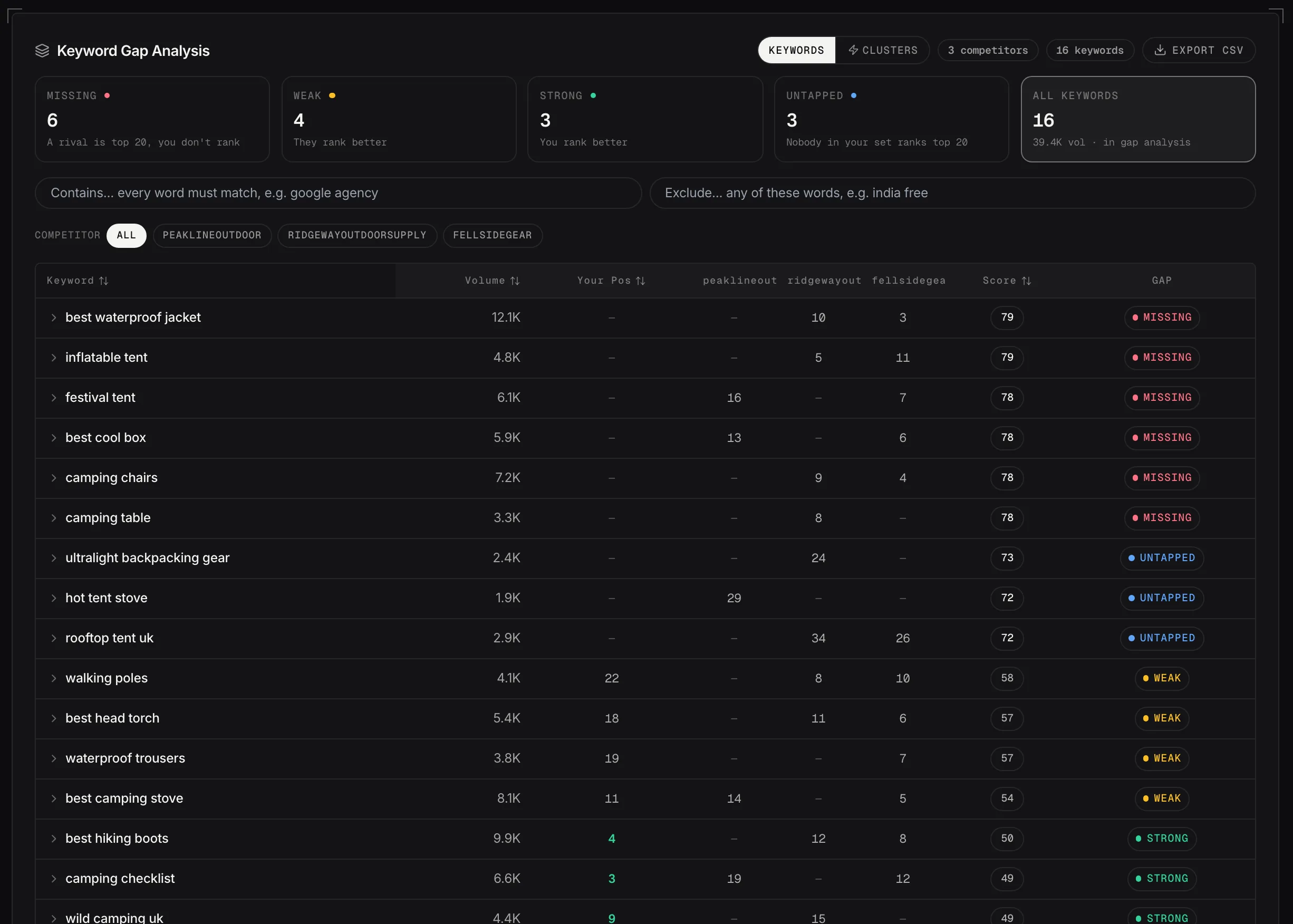
The keyword gap: what each rival ranks for, where you stand, and what kind of gap it is.
Demo dataThe toggle above the table changes what a row is, and the two views answer different questions. A single missing keyword rarely justifies a new page. A cluster of related gaps is a far stronger signal that a topic deserves its own page or a substantial update.
Keywords
Your position, a column for each competitor, and an opportunity score. Open a row for the close variants, which pages rank, and the actions.
Clusters
Keywords grouped by what they’re about, with the combined volume and a breakdown of how many inside are missing, weak, strong or untapped.
The opportunity score
Estimated search volume is 40% of it, the gap to the strongest competitor 30%, weak ad competition 15% and commercial value 15%. Sorting by it is the default, and it’s there to help you sort the list rather than to replace your judgment.
Why ad competition counts
Paid competition is one directional read on how commercially contested a query is. It isn’t an organic ranking factor, and it isn’t treated as one.
What commercial value means
The paid click price on the keyword, capped so one expensive term can’t dominate the score. Advertisers bidding higher to appear is a directional read on what a search is worth commercially. It isn’t what an organic visit is worth to you, and it isn’t treated as one either.
Two text boxes and a row of competitor pills sit under the cards and stack with whichever one is active.
NARROW THE LIST
Includeboots, waterproof, walking
Excludejobs, free, us
COMPETITOR
KEYWORDS
1,900 gapsbefore filtering
214 gapsmatch what you sell
The five cards recount themselves against whatever is selected.
Export CSVall 214 rows, not just this page
Cut it to what you sell
Filter for the terms that match what you sell, and exclude the themes that don’t: jobs, free, and the markets you don’t serve.
One competitor at a time
Pick a competitor and the five cards recount themselves against that slice, so you can read one competitor’s gap profile on its own rather than the merged picture.
Export the filtered set
From the Keywords view, the CSV carries what you filtered and sorted, every matching row rather than just the page of the table in front of you, with the positions, the score and the gap type alongside each keyword.
Ask Advisor
Opens the Strategic Advisor with the keyword, the estimated demand and the competitor positions already in the prompt. Review it, change it if you want, then send.
Content Studio
Opens Content Studio with the keyword or cluster already loaded, along with the context for improving a page you have or writing one you don’t.
View analyzer issues
On a row you rank for, a third button opens the workspace filtered to that URL, so what the analyzers found on it is one click from the gap that sent you there.
Competitor keyword counts and your coverage of them come from third-party ranking data. They’re useful for comparing domains measured the same way, and they aren’t traffic figures. Your actual clicks and impressions stay in Command Center, where they come from Search Console, which is why no estimated visit count sits beside these.
Cached rankings
Competitive Landscape works from stored ranking data rather than checking the live results every time you filter. The page says when that data was refreshed, so you know how current the comparison is.
Two thousand keywords a domain
A deep ranked-keyword profile, and not everything anyone ranks for. Untapped in particular describes the keywords collected for your tracked set, rather than a statement that nobody else in Google ranks for them.
The rivals you name, their ranked keyword visibility, and the gaps between you.