Sign up for beta

Everything Search Console knows about you, in one place you can read.

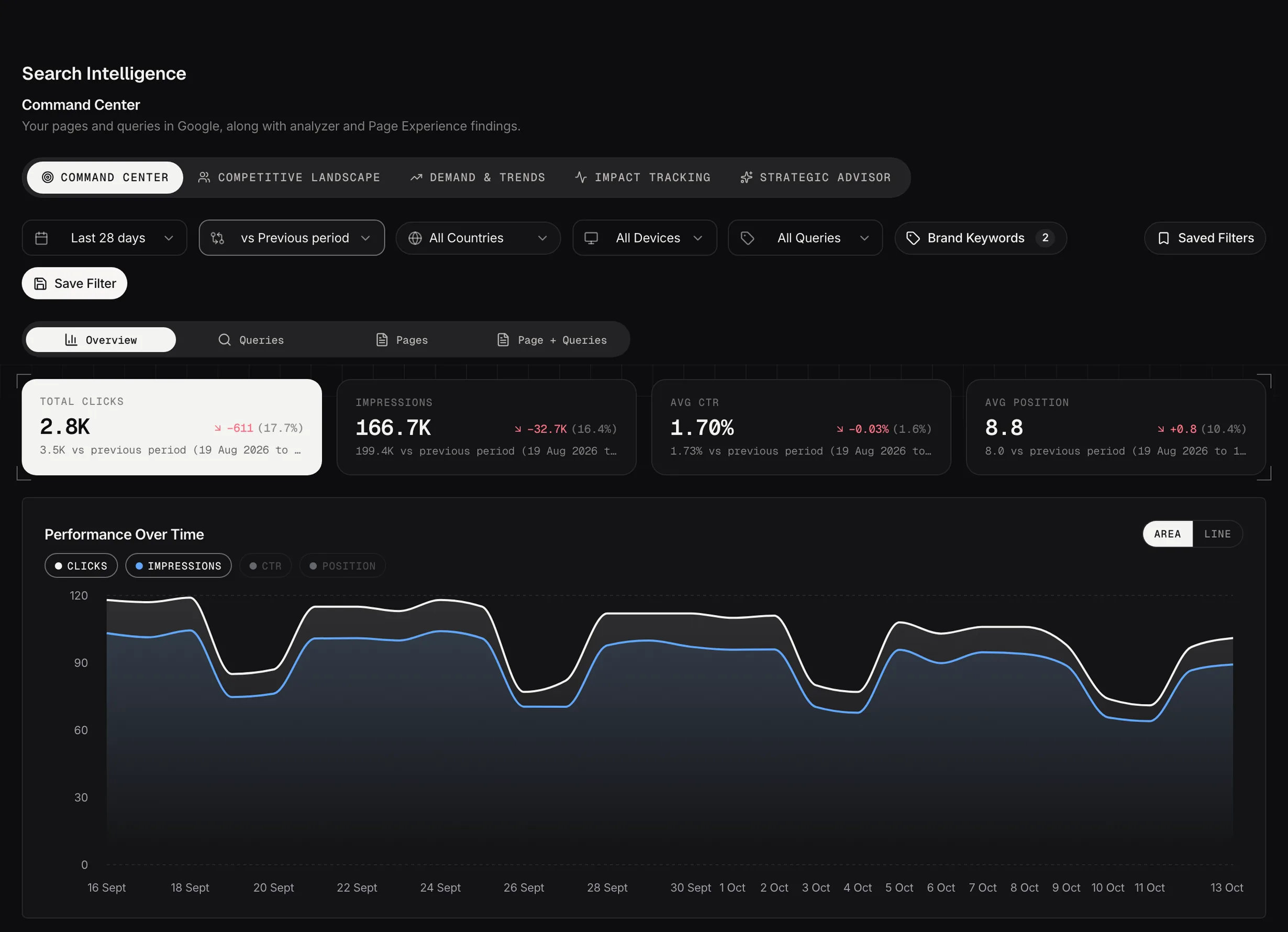
Clicks, impressions, click-through rate and position, with every query and every page behind them, and the change against the period before.

Then the part Search Console can’t do: what happened to a page after you changed it.

Command Center · Northwood Outdoors

LAST 28 DAYS

Total Clicks4,218 · +11%

Impressions186,904 · +6%

Avg CTR2.26% · +0.1pt

Avg Position14.8 · better by 1.2

vs previous period · 31 May to 27 Jun

THE DETAIL BEHIND IT

OverviewQueriesPagesPage + QueriesImpact Tracking

BrandNon-brand

1,704 clicks2,190 clicks

the two never quite reach the headline: Google withholds some queries

The headline

A change figure you can actually trust

Total Clicks, Impressions, Avg CTR and Avg Position, each with the change against the comparison period. The comparison is named in full underneath, with its dates, so there’s never a percentage without a period attached to it.

Compare against what you choose

Last month, last year, or one campaign

The previous period is the default: the same number of days immediately before. Year on year is the one to use when your demand has a shape to it, and a custom range is there for comparing against a specific campaign.

When the history isn’t there

It tells you rather than inventing a number

If your history starts inside the comparison window, the card reads no comparison data rather than inventing a percentage. A banner above the report explains which part of the window has no data behind it.

A zero it can’t stand behind

Doesn’t get shown as one

When the window you picked has no data behind it, the cards read still syncing rather than zero. That’s a new account waiting for its first import, and it’s also an established one filtered to a country it gets no traffic from.

The detail

Every query, every page, and the two together

Four tabs over the same data at different grains, plus Impact Tracking. The thing worth knowing about the Queries and Pages and Page + Queries tabs is that their search queries the whole dataset rather than the rows on screen, so a term you can’t see is still findable.

Queries

Every search that brought you impressions

Fifty at a time, the biggest by impressions, with a brand badge on the ones matching your brand list. The number columns re-sort the page you’re on. Hover a row to copy the query.

Pages

Every page that appeared in search

Open a row and you get that page’s clicks and impressions over time, plus an Ask Advisor button that takes the page to your strategist with the numbers already attached.

Page + Queries

Which searches each page is winning

The one to use when a page is moving and you want to know which queries moved it. Every page expands into its own query table, fetched when you open it.

The fix, one click away

What the analyzers found, on the row

Where an analyzer has found something on a page, the row carries a chip that opens the workspace filtered to that URL. The report and the fix are one click apart.

Brand against non-brand

The split that tells you whether search is working

Traffic from people typing your name is not the same business as traffic from people who have never heard of you. Growth that is all brand means your marketing is working and your search presence isn’t, and the two cards here are how you tell them apart.

Brand keywords   northwood northwood outdoors northwood boots north wood northwod northwood co uk   4,218 clicks 1,704 brand 2,190 non-brand

How it decides

A list of words you write

Any query containing one of your brand keywords counts as brand. It’s a plain text match, so put your company name, your product names and the misspellings people actually type into the list.

Set it on day one

Or the card reads zero

With nothing in that list, the brand card reads zero, and zero looks like a measurement. It isn’t. It means nothing has been told what your brand is. The button sits in the filter bar on this screen rather than in Settings.

Why the two don’t add up

And why that’s honest

The split reads a query-level table, and Google withholds the queries for a slice of traffic. So brand plus non-brand comes to less than the headline clicks. Adding the difference to one side would make the numbers tidy and wrong.

Impact Tracking

The tab that closes the loop

Every finding you mark as applied in a workspace turns up here with the search performance for that page, so the question "did any of that work" has an answer rather than an opinion.

The baseline

The four weeks before you changed it

Taken at the moment you mark it applied and stored, so later edits can’t quietly move what you’re measuring against. Change the date and it re-baselines, which the dialog says while you’re doing it.

What you see

Clicks, impressions and position, before and after

Three cards per page, each showing the last 28 days, the change against the baseline, and what the baseline was. A page changed more than once keeps one card with a timeline on it, and the comparison stays against the first change.

Track a page yourself

For the changes Searchscope didn’t suggest

Marking a finding applied tracks the URL in the finding, which isn’t always the URL you changed. Fixed a cannibalization clash by rewriting the other page? Add that one by hand: the URL, what you changed, and the date.

It fills as you work

Nothing to set up

Nothing appears until you mark something applied or add a page yourself, so an empty tab on a new account is the expected state rather than a fault.
Filters

Set them once, save them, stop setting them

Date range, comparison, country, device and brand or non-brand, in one bar above the tabs. Any combination can be saved with a name, and one of them can be the default that loads with the screen.

A saved filter is relative

So it doesn’t go stale

Save "non-brand, mobile, last 28 days" and it means the last 28 days every time you load it, not the 28 days that were current when you saved it.

The window ends where the data ends

Not at yesterday

Search Console runs two or three days behind, so the ranges here end at the newest day actually imported. That’s why a 28-day window can end four days ago and still be 28 days.

Join the beta program

Read your own numbers first

Everything else in Searchscope is a comparison against them.

Join the beta