Mode 01
Improve a page
Paste in a URL. Searchscope loads the page, its open findings and the pages currently ranking above it for the target query.
Most AI writing tools start from an empty prompt. They have no access to your site, your rankings, or what your last audit found.
A Content Studio session opens with the page you’re improving, relevant ranking competitors and your open findings already loaded. Then you work through the brief or draft in the chat, while the document builds alongside.
SESSION MODE
Page URL/guides/camping-stoves
Will read: the page · top 10 US results · your business context
GETTING READY
Read your pagedone
Find the top-ranking competitorsdone
Read the competitor pagesdone
Open the chat, brief in handdone
The chat opens by itself when everything is ready.
COMPETITORS IN HAND
outdoorgearlabpos 1
switchbacktravelpos 2
rei.compos 4
Each mode asks for what it needs and nothing else, so the session opens pre-filled rather than empty.
Mode 01
Paste in a URL. Searchscope loads the page, its open findings and the pages currently ranking above it for the target query.
Mode 02
Give it a topic or keywords. Searchscope checks what’s already ranking before anything is written.
Mode 03
Choose an open finding and start the session with its evidence and recommended action already loaded.
Mode 04
Skip the setup and open the chat, with your business context already loaded.
Formats
Blog post, landing page, product page, pillar guide, comparison, category page, press release, pitch email, guest post, data story and social post. The PR formats skip the competitor ranking research, because it doesn’t apply to them.
Voice
Choose from six tone presets and set the market used for search research. By default, Searchscope uses the country where the account receives the most search traffic.
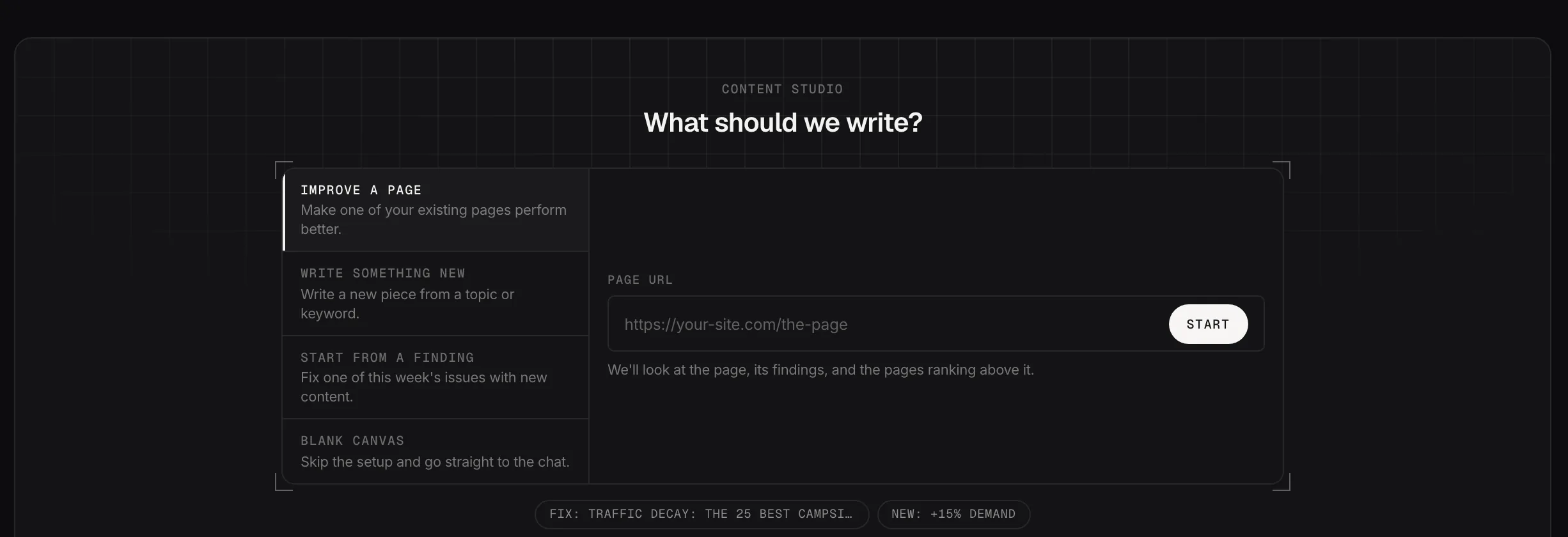
Four ways to start a session.
Demo dataThe difference between a generic AI draft and a useful one is what the model has to work from. This is the context Content Studio gathers before you start working in the chat.
Source 01
Fetched fresh every session rather than pulled from a cache. If the site blocks the request, Searchscope falls back to its own crawl and shows the date of that copy.
Source 02
Searchscope collects the top ten results for the target query in your chosen market and analyzes the ranking pages. Open the extracted outline for each competitor to see its H1, H2s, H3s and structured data.
Source 03
The session includes open analyzer findings for the page, internal linking opportunities from your crawl and search data, and the business context saved in your account.
Three panes. You talk on the left, the document builds in the middle, and the right-hand panel keeps the research behind the session in view.
Pane 01
Ask for a brief first or go straight to a draft. During the session the chat can work with your Search Console queries, crawl data, analyzer findings, AI visibility, brand mentions and web research when relevant.
Pane 02
The draft builds beside the conversation rather than being buried inside it. Ask for it to be shorter, punchier or expanded with an FAQ, and the document updates in place.
Pane 03
See the data and research used during the session alongside the competitor outlines. Internal link suggestions also show why they were selected, separating pages with matching search-query evidence from word-level matches.
CHAT
Improve this page for “camping stove guide”.
I’ve read your page and the ten above it. Brief first, or go straight to the draft?
Brief first.
DOCUMENT
Brief · camping stove guide
H2 · How much fuel a weekend actually takes
H2 · Canister vs liquid, by trip length
SESSION CONTEXT
your pagelive
top 10 resultsUS
competitor pages4
open findings3
internal links8
A draft that invents a product name or a statistic creates more work than it saves, because someone has to catch it first.
Check 01
Product names, prices and figures that don’t appear in the session sources are flagged for review. Names found only on competitor pages are identified separately.
Check 02
If the brief set a target word count, the draft is measured against it rather than left for you to notice.
Check 03
When a session starts from a Searchscope recommendation, Content Studio checks whether the draft covers the points included in that recommendation.
Content Studio keeps the finished draft in your hands. Review it, make changes, copy it or download the Markdown before it moves into your publishing workflow.
The session appears automatically in Content Planner with its current status, so the plan stays up to date without a separate handoff.
Connect your site and start with a real page, keyword or finding. Content Studio brings together your search data, competitor research, analyzer findings and business context before you start writing.